API Settings
Manage API keys and webhook settings.
API settings are for developers and connected systems.
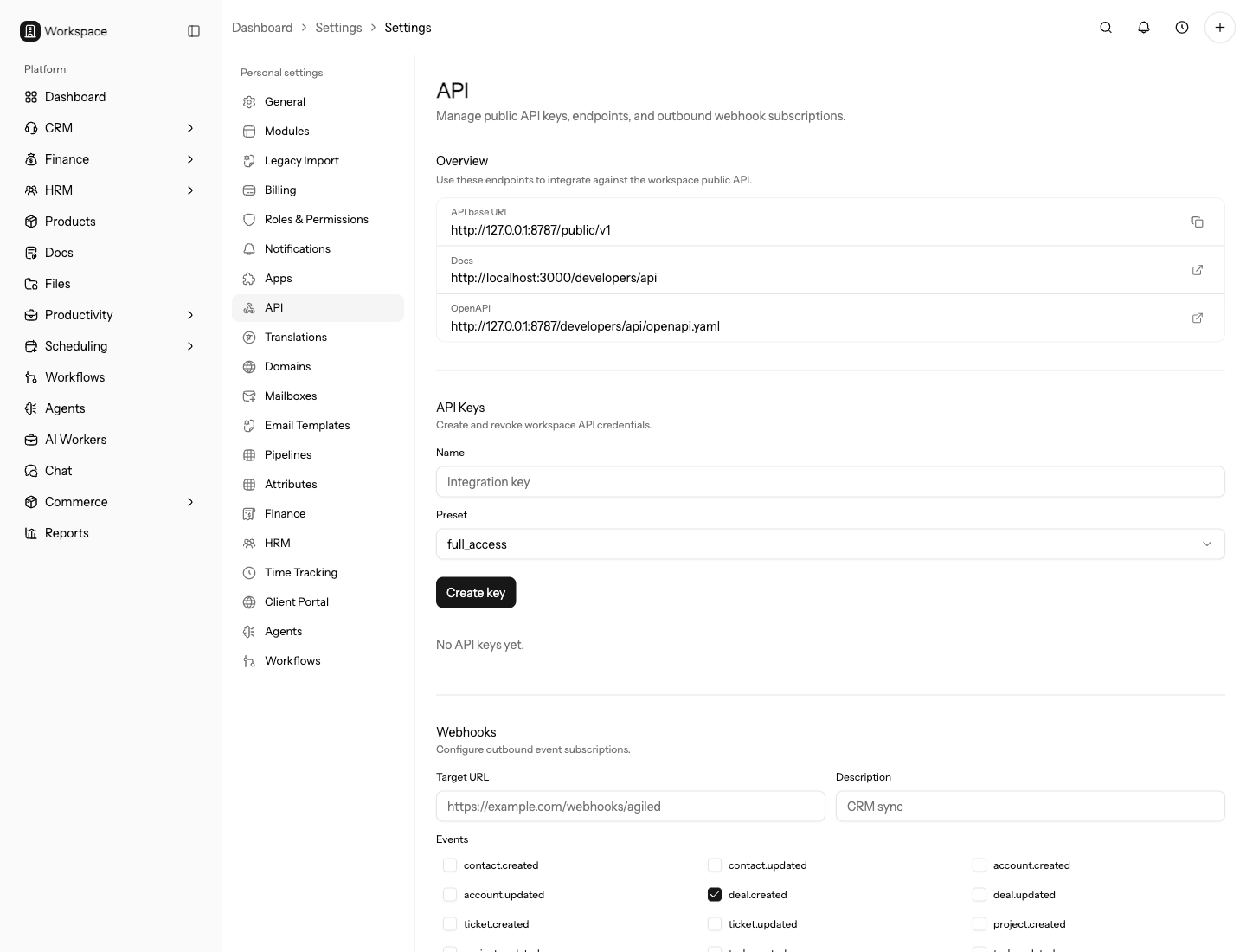
Use this page to manage how external systems read, write, and receive events from Agiled.
Review this page before giving a vendor or automation access to workspace data. API access can affect CRM, finance, files, webhooks, and reporting.
API Keys
Create API keys only for trusted server-side systems. Store keys securely and rotate them when access changes.
API key presets include read-only and full-access options. Use read-only unless the external system must create or update records.
Create separate keys for each integration and environment. This makes rotation and troubleshooting safer.
Use clear names that identify the system, environment, and owner. During an incident or vendor change, the name is often the fastest way to know which key can be revoked safely.
Before Creating Access
Decide exactly what the external system needs to do. A reporting job usually needs read-only access. A migration or automation job may need write access for a short period. Do not create a full-access key because the future use case is unclear.
Name keys after the system and environment, such as warehouse-production or
crm-reporting-staging. Vague names make it harder to revoke the right key
later.
Webhooks
Use webhooks to notify external systems when important events happen in Agiled. Review delivery history after adding or changing webhook subscriptions.
Start with a narrow event set and confirm the receiver verifies signatures before subscribing to high-volume events.
Assign an owner to every webhook. If the endpoint starts failing, someone should know whether to repair it, pause it, or remove it.
Add a Webhook Safely
Before adding a webhook subscription, make sure the receiving endpoint is already deployed, reachable over HTTPS, and able to handle retries. Subscribe only to the events the receiver actually uses.
After saving the webhook, trigger one safe test event and review delivery history. Confirm the receiver processed the event once and ignored duplicate deliveries if the provider retried.
API Settings Page
The API settings page can show:
- Public API base URL.
- OpenAPI URL.
- API docs URL.
- API keys.
- Webhook subscriptions.
- Webhook delivery history.
- Available webhook events.
Only owners and admins can manage keys and webhook subscriptions.
Review this page after vendors, employees, or automation jobs change. Revoke unused keys and remove webhook subscriptions that no longer have an owner.
Access Review Routine
Review API settings whenever a vendor is added, an employee leaves, an automation is retired, or a system moves from staging to production. Every key and webhook should have a current owner and a clear purpose.
During review, revoke keys that have no owner, no current system, or no recent business reason. Remove webhook subscriptions whose receiving endpoint no longer exists or no longer processes the event.
Operational Checklist
- Use separate API keys per system and environment.
- Keep webhook event subscriptions narrow.
- Verify webhook signatures in the receiver.
- Review delivery failures after changes.
- Remove access when an integration is retired.
Troubleshooting
If an integration fails, test the base URL and API key first, then check endpoint permissions, webhook delivery history, and recent key revocation.
If webhook deliveries fail repeatedly, pause the subscription or narrow the event set while the receiver is repaired. This prevents a broken endpoint from hiding new failures in noisy delivery history.