Create an API Key
Create and protect an API key for server-side integrations.
Use this guide when an external system needs to call the Agiled public API.
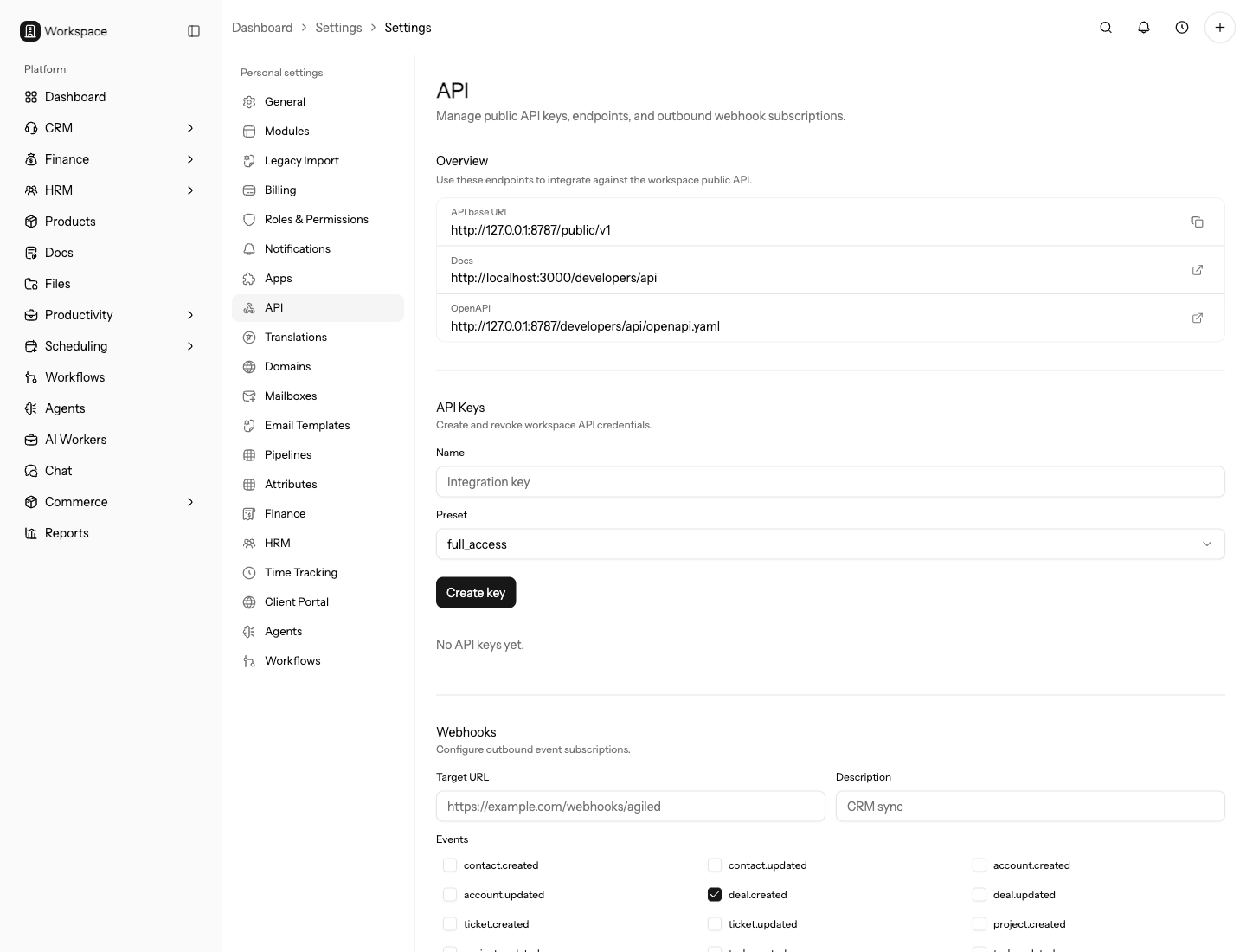
Before You Create A Key
Decide what the integration should do:
- Read records for reporting or exports.
- Create records from another system.
- Update records after a sync.
- Receive webhook events and then call the API for more detail.
Use the narrowest key that fits the job. Read-only keys are safer for reporting, dashboards, and audits. Full-access keys should be reserved for trusted server-side jobs that must write records.
Decide ownership before creating the key. The owner should know where the key is stored, which external system uses it, what data it can access, and when it should be rotated.
Confirm whether the integration is for production, staging, or a one-time migration. Use separate keys for each environment so test activity and live data are not mixed.
Steps
- Open API settings.
- Create a new API key.
- Copy the key once and store it in a secure server-side secret manager.
- Use the key from backend code only.
- Test a simple API request.
- Rotate or revoke the key when access changes.
Name the key after the integration, environment, and owner. For example, use a
name like Warehouse sync - production - Ops instead of New key. Clear names
make audits and revocation safer later.
Security Rules
Never put API keys in browser code, mobile apps, public repositories, frontend environment variables, screenshots, or support messages.
Rotate a key when a teammate leaves, a vendor no longer needs access, a secret may have been exposed, or the integration changes ownership. Revoke unused keys instead of keeping them for future reference.
If a vendor needs access, share the key through an approved secret-sharing process and document the vendor owner. Do not send keys through chat, email, or issue comments.
Test Request
After storing the key, test a low-risk request:
curl "$AGILED_API_BASE_URL/public/v1/me" \
  -H "Authorization: Bearer $AGILED_API_TOKEN"
If the request returns unauthorized, confirm the key was copied completely. If it returns forbidden for a resource request, the key does not have the required ability.
Run the first write test against a low-risk record. If the integration creates or updates data, confirm the created record, linked account, owner, source, and duplicate behavior before letting the job run on live batches.
Operational Checklist
Before enabling a production integration:
- Store the key in a backend secret manager.
- Set the correct API base URL for the environment.
- Add request logging without printing the token.
- Handle
401,403,404,422, and429responses. - Use idempotency for retryable writes.
- Document who owns key rotation.
Rotation And Revocation
Rotate keys on a schedule and whenever access risk changes. Create the replacement key, update the external system, run a test request, then revoke the old key after the new one is confirmed.
Revoke a key immediately if it was pasted into a ticket, committed to source control, shared with the wrong vendor, or used from an unexpected system. After revocation, review recent API activity and any records the integration can write.
After rotating, keep the old key active only long enough to confirm the new key works. Then revoke it so old deployments and forgotten scripts cannot keep access.